Obsidian Tips & Tricks
Quote Block & Bullet Point Relationship Lines

If you want to point out some text in Obsidian, you can use > and then write text.
Now you see text is pointed out.
Enjoy using this.
If you want to have this:
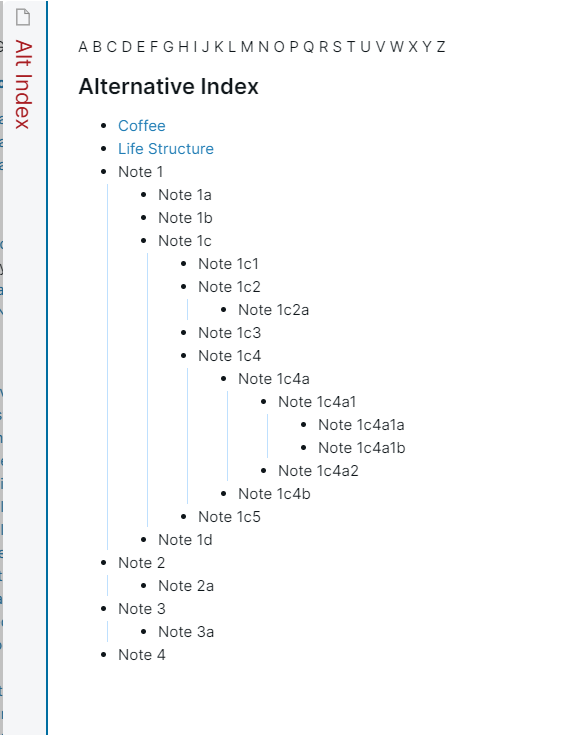
follow these steps:
First download any text editor like Atom, Sublime Text 3, Visual Studio Code*
Open the .obsidian folder in the text editor and open the .css file with the name of the theme you are using.
Go to the end of the file and paste this code:
.cm-hmd-list-indent .cm-tab, ul ul { position: relative; }
.cm-hmd-list-indent .cm-tab::before, ul ul::before { content:''; border-left: 1px solid rgba(0, 122, 255, 0.25); position: absolute; }
.cm-hmd-list-indent .cm-tab::before { left: 0; top: -5px; bottom: -4px; }
ul ul::before { left: -11px; top: 0; bottom: 0; }
Bonus Tip for programmers
If you use Obsidian for studying you can use his syntax highlighting
for snippets of your code.
To have the syntax highlighting you need to this:
First, write ``` and then write the name of the programming language your code is written.
Second, write your code here
After that just type again ``` and your code is highlighted
Thanks for reading, see the next time!!!